There is a feature in Powerlynx called “Trial sessions” which we developed for cases where we can’t detect some Walled Garden hosts but still need the client to make a payment.
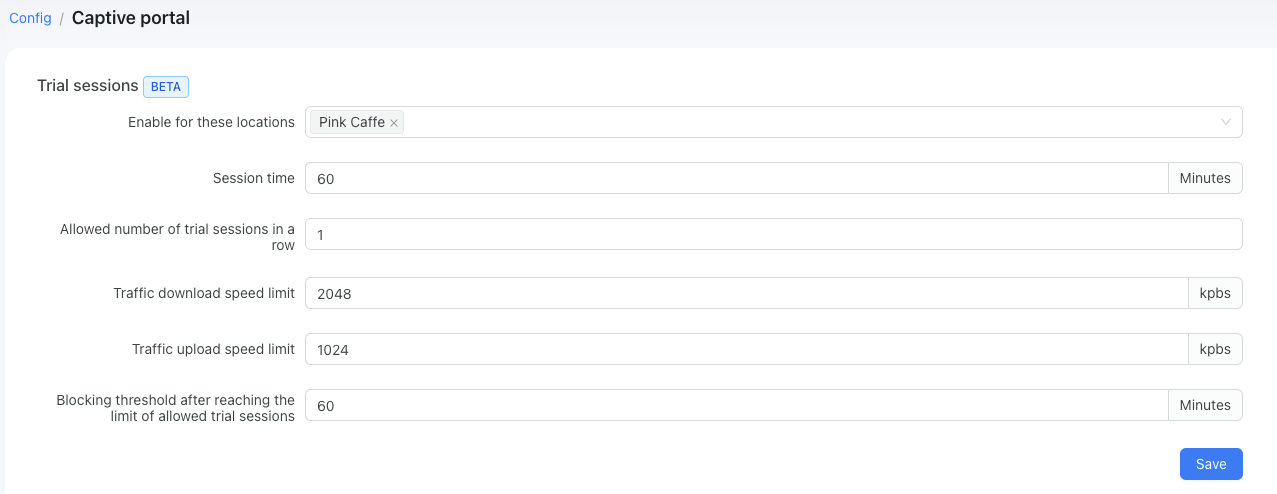
When a customer selects the “Pay with Payfast” button, Powerlynx creates a trial session on a router for the client and the client is authorized on a server. This allows them to access the internet for a specific period of time in order to make a payment. There is no need to configure Walled Garden hosts when using this feature, as it is automatically skipped. The customer will not be informed that they have free internet access for a certain period of time, as we do not want to provide this information 
After making a payment, the trial session will be replaced with a normal session based on the data plan settings. A CoA packet will be sent to the router to adjust the speed as well.
In my example (from the screenshot above), I allow my customers to have a trial session of 60 minutes to make a payment (although I believe 5-10 minutes will be sufficient). The speed will be 2mbps/1mbps, and after the session times out, customers will not be able to access this option again for the next 60 minutes (due to the blocking threshold setting).