Hello Rob,
Thank you for reaching to Powerlynx forum.
I’m Alex, Support Engineer at Powerlynx.
Regarding MikroTik, TP-Link Omada, and Starlink Integration
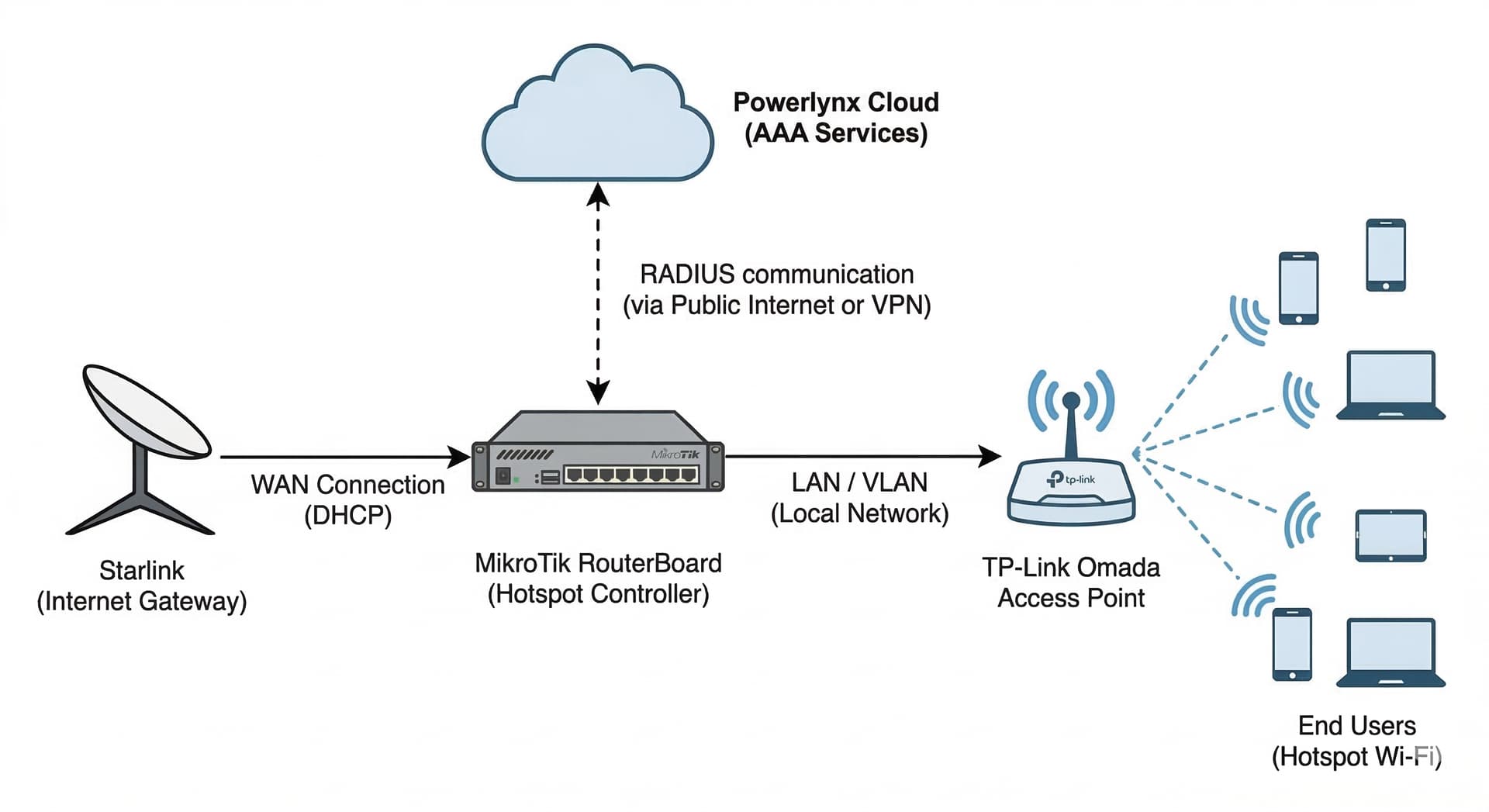
In your scenario, the recommended logical network topology is as follows:
Powerlynx (Cloud) → Hotspot Controller (MikroTik) → Access Points (TP-Link Omada)
- Access Points (AP): These act as wireless stations for end users, forwarding all traffic to the MikroTik hotspot controller.
- Hotspot Controller: A MikroTik device connected to both Powerlynx and the local network. It is responsible for intercepting unauthorized traffic and redirecting users to the Powerlynx Splash Page. In this setup, Starlink serves as the primary WAN gateway for the MikroTik device.
- Powerlynx: Provides AAA (Authentication, Authorization, and Accounting) services. It instructs the MikroTik controller on session management, including when to allow, throttle, or disconnect specific users.
Visual Network Topology
This is a diagram representing this architecture for your reference:
Example Configurations:
- MikroTik Controller with AP connected via VLAN
- Simple Setup: MikroTik Hotspot Controller with Access Points
Licensing and Scalability
Question: We have 3 sites that will be using the service; how does the licensing work? Do we need multiple instances or can all three sites be serviced by one?
Powerlynx licensing is based on concurrent online users (sessions) rather than the number of physical network sites or controllers.
You do not need multiple Powerlynx instances. All three of your sites can be managed from a single Powerlynx instance, allowing for centralized management of your data plans, customers, and vouchers across all locations.
Next Steps
You can register for a trial session and begin testing immediately:
- Trial Registration: https://powerlynx.app/
- Getting Started Guide: https://docs.powerlynx.app/getstarted.html
Additional Resources:
- Official Website: https://powerlynx.app/
- Documentation: https://docs.powerlynx.app/
- Community Forum: https://forum.powerlynx.app/
If you need further assistance, feel free to reach out to us at support@powerlynx.app.